Find the checking code
The handout is a 15 KB executable. It asks for a flag, then prints
Correct! or Incorrect!. Start with a
simple request to your agent.
Use REA to analyze ms_flag_checker and find the flag. Explain how the checks work, then verify the answer with the original program.
An example prompt, with the downloaded challenge available locally and a native analysis provider connected.
-
Follow the input prompt to its function
Agent → REAopen_binary {"path": "ms_flag_checker"} search_strings {"pattern": "flag|correct|wrong|input", "mode": "regex", "case_sensitive": false} xrefs {"address": "0x102004"} resolve_containing_procedure {"address": "0x10126d"}REA → agent · selected results0x102004 "What is the flag? " 0x10201c "Incorrect!" 0x102027 "Correct!" Prompt referenced at: 0x10126d Containing function: 0x10124dThe reference gives the agent a place to investigate, even though the executable's original function names have been removed.
-
Read the checker and its two helpers
Agent → REAanalyze_function {"procedure": "0x10124d"} analyze_function {"procedure": "0x101189"} analyze_function {"procedure": "0x101217"}REA → agent · selected instructions0x1012c1: CMP EDI, 0x24 0x1012c6: LEA RBX, [0x1040e0] 0x1012cd: LEA RBP, [0x104060] 0x1012d4: LEA R13, [RBX + 0x270] 0x1012e1: CALL 0x00101189 0x1012ec: CALL 0x00101217 0x1012f1: CMP dword ptr [RBP], EAX 0x1012f4: JNZ 0x00101335 0x1012f6: ADD RBX, 0x18The first loop copies 36 character codes. The checking loop decodes a mask, sums the selected codes and compares the result with a stored number. Its
0x18-byte steps across0x270bytes give 26 masks.
These are selected results from a fresh REA analysis. The local target path is shortened for display; addresses refer to REA's imported image.
One check reveals one character
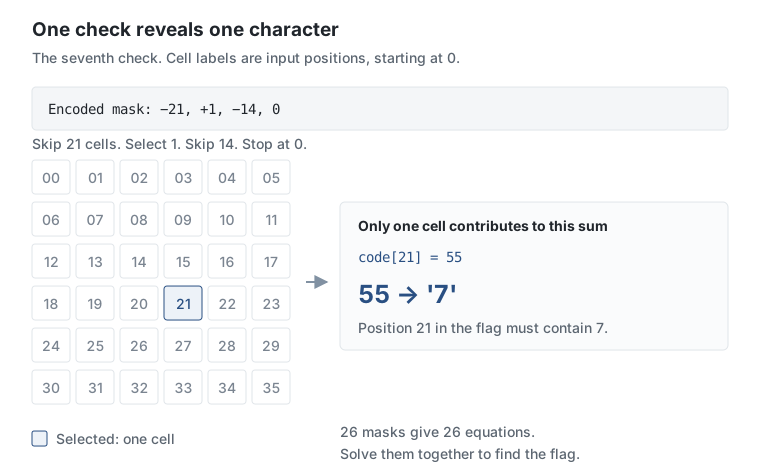
The checker arranges the input in a 6×6 grid. A mask chooses which cells contribute to a sum. Its compact encoding uses negative numbers to skip cells and positive numbers to select them.
Read the mask and its target from the binary
{"address": "0x1040e0", "length": 624}
{"address": "0x104060", "length": 144}Mask at 0x104170:
eb 01 f2 00 → -21, +1, -14, stop
Target at 0x104078:
37 00 00 00 → 55
The instruction MOVSX reads mask bytes as signed
values. This is why eb means −21. The target is a
little-endian integer. Together, these bytes tell the agent that
code[21] = 55, so that character is 7.
From instructions to a readable check
Select a step to connect the summing helper and its caller to the same rule in C.
0x10121c: MOV ECX, 0x0

0x10122c: CMP dword ptr [RSI + RAX*0x1], 0x0
0x101230: JZ 0x00101223

0x101232: ADD ECX, dword ptr [RDI + RAX*0x1]

0x101223: ADD RAX, 0x4

0x1012f1: CMP dword ptr [RBP], EAX
0x1012f4: JNZ 0x00101335int check_one_mask(const int codes[36],
const int mask[36],
int target) {
int total = 0;
for (int i = 0; i < 36; ++i) {
if (mask[i]) {
total += codes[i];
}
}
return total == target;
}
01 · Start at zero. ECX holds
the running sum.
02 · Check the mask cell. A zero value skips the character; a nonzero value includes it.
03 · Add a character code. The input's integer at the same offset is added to the sum.
04 · Move to the next cell. The original loop advances four bytes per integer and visits six rows of six cells.
05 · Compare with the stored target. The
caller receives the sum in EAX. A mismatch jumps
to Incorrect!.
The instructions come from the summing helper and its caller. The C is an explanatory summary with descriptive names and a flattened 36-cell loop.
Solve the 26 equations
Most masks select several cells. For example, the first check adds 16 character codes and requires a total of 1441. The overlapping selections give equations that a small Python script can solve together.
from z3 import Int, Or, Solver, Sum, sat

codes = [Int(f"code_{i}") for i in range(36)]
solver = Solver()
alphabet = "abcdefghijklmnopqrstuvwxyzABCDEFGHIJKLMNOPQRSTUVWXYZ0123456789_{}"
for code in codes:
    solver.add(Or(*[code == ord(c) for c in alphabet]))
for code, char in zip(codes, "DUCTF{"):
    solver.add(code == ord(char))
solver.add(codes[-1] == ord("}"))

for selected, target in checks:
    solver.add(Sum([codes[i] for i in selected]) == target)

assert solver.check() == sat
model = solver.model()
print("".join(chr(model.eval(code).as_long()) for code in codes))
Z3 is a solver that finds values satisfying these equations. This
excerpt uses the extracted checks and assumes a
DUCTF{…} flag with letters, digits, underscores and
braces. The complete download includes all 26 masks and targets.
Check the answer with the original program
REA's process capture records the original executable accepting
the solved flag. Changing one selected character from
z to y makes the first sum 1440 instead
of 1441, and the program rejects it.
| Input | Observed output | Exit code |
|---|---|---|
| Solver's flag | Correct! |
0 |
| One character changed | Incorrect! |
255 |
Show the recovered flag and captured output
What is the flag? DUCTF{ezzzpzzz_07bcda7bfe81faf43caa}
Correct!
The recovered value also matches the flag in the organizers' published challenge metadata, checked after solving the binary.
Source, target identity and analysis details
Fresh analysis and two process captures on 8 October 2026, using REA 4.1.0 with Ghidra 12.1.4 on Linux x64. The binary is a stripped x86-64 ELF, 15,248 bytes.
dcd3bec4f608e11f3a12ce461100aaf5f621851ee63a1f870d7c90d4e3dd51aeThe string references, functions and constants were inspected before reading the organizers' source or solution. The Python solver and the diagram were built from those REA results.
Compare with the organizers' source · Challenge metadata and flag · REA evidence notes
Try it yourself
Download the original challenge and the solver into one folder. Use the prompt above to investigate with your agent, or run the included script.
python3 -m venv .venv
.venv/bin/python -m pip install z3-solver
.venv/bin/python solve.py

chmod +x ms_flag_checker
./ms_flag_checker
The script prints a candidate flag; paste it at the program's
prompt. Solving needs Python and z3-solver. Running
the original executable needs Linux x86-64.